![Logo Meetingselect RGB-3-1.svg]](https://web.meetingselect.com/hubfs/Logo%20Meetingselect%20RGB-3-1.svg)
Would you like to be reminded of your upcoming booking in advance? By enabling notifications for upcoming arrivals, you will automatically receive a reminder before your reservation takes place. This helps you stay informed and ensures you never miss an important booking.
Enable upcoming booking notifcations
-
Log in to your Meetingselect account.
-
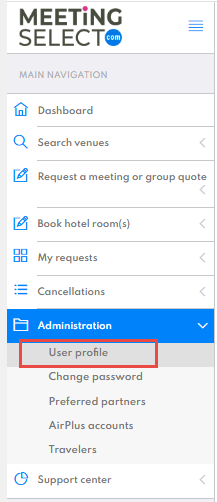
Go to your user profile.
-
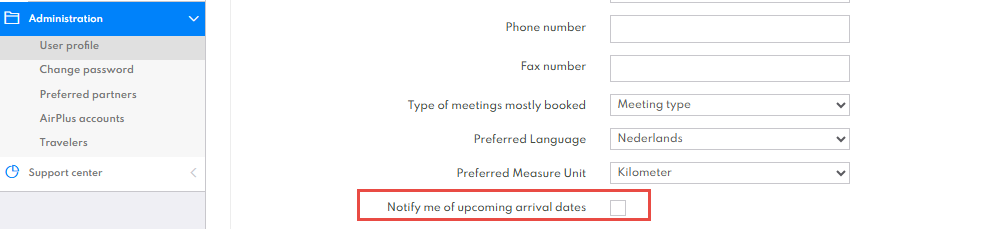
Enable the option Notify me of upcoming arrival dates by checking the box.
-
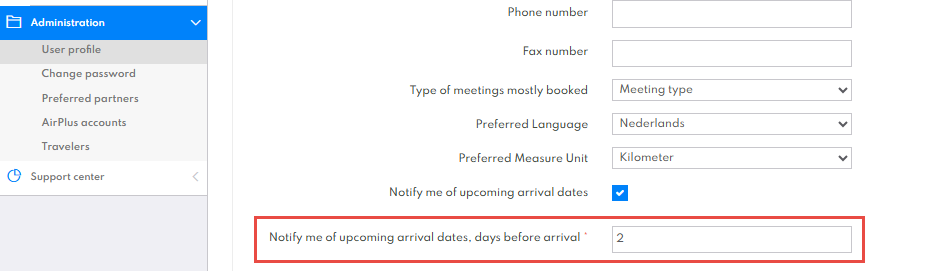
An additional setting will appear: Notify me of upcoming arrival dates, days before arrival. This is a required field once notifications are enabled. Specify how many days before arrival you would like to receive the reminder.
-
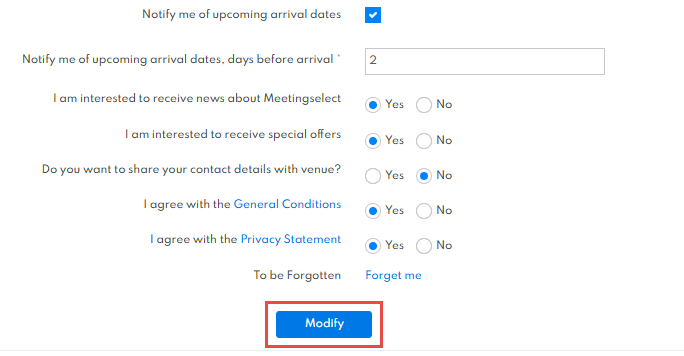
Click Modify to save your changes.
What happens next?
You will automatically receive a reminder based on the number of days you selected before the arrival date of your booking. This ensures you stay informed and prepared for your upcoming reservations.